

"File formats: YUV" configuration dialog
This dialog allows to specify parameters of YUV file / stream format.
For additional information about YUV formats please visit the web page YUV, YCbCr, YPbPr color spaces at the Breeze support web site Breeze Help
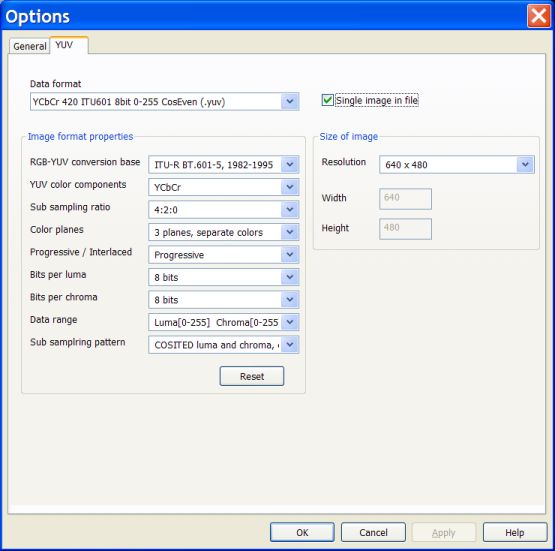
The following configuration settings allow to specify a YUV file / stream:
Data format" combo box
This combo box allows specifying YUV image format entirely.If you know exactly the name of required format then you can select it from the full list in this combo box.
The list of displayed YUV formats depends on the filter values selected in the other combo boxes, placed under "Data format" combo box.
All available formats are displayed in the list when values of filters are set to "Any" value. It means that YUV format is specified in general only.
To make specification more definite, filters have to be set to the concrete values. As a result, a list of YUV formats displayed in the "Data format" combo box becomes shorter. The more filters are set to the definite values, the more precisely YUV format is defined.
"RGB-YUV conversion base" combo box
This combo box specifies an RGB-YUV conversion base.Conversion base is defined, first of all, by the formulae coefficients. Breeze supports major international standards specifying RGB - YUV conversion.
"YUV color components" combo box
This combo box specifies YUV color componets as they are defined in the concrete YUV color spaces.
"Sub sampling ratio" combo box
This combo box specifies sub sampling ratio for chroma color components.
"Color planes" combo box
This combo box specifies a structure of color planes and how individual colors of each pixel placed in the color planes.There are two major variants, planar and interleaved. In the first variant data describing a color component are saved in one continious array. For 3 color components 3 color planes are used. In the second variant all color componets describing one pixel are kept together, one after another. In this variant only one inteleaved color plane is used.
"Progressive / Interlaced" combo box
This combo box specifies a frame scan structure.Entire horizontal line of pixels is called image scan line. Hardware equipment usually scans images line by line; in a whole scan line units. There are two major variants of scanning image, progressive and interlaced.
In the progressive scan scheme an image is scanned entirely, line by line.
In the interlaced scheme an image is scanned in two stages, even and odd. At the even stage all even lines of image are scanned; then at the odd stage all odd lines are scanned. These two sub groups of scan lines are usually saved separately. When image is restored for displaying to a user, scan lines from the even and odd sub groups are joint in one image by the special procedure called "deinterlacing"
"Bits per luma" combo box
This combo box specifies how many bits per luma color component is used to represent data for one pixel.
"Bits per chroma" combo box
This combo box specifies how many bits per chroma color component is used to represent data for one pixel.
"Data range" combo box
This combo box specifies the range of values used to represent luma and chroma withing limits of minimum and maximum values.For example, if 8 bits is reserved for luma and chroma color components, then the minimum value is 0, and maximum value is 255. At the same time concrete YUV format may require using more narrow range of values, for example 16 - 235 for luma, 16 - 240 for both chromas.
"Sub sampling pattern" combo box
This combo box specifies a pattern of sub sampled chroma components.
"Single image in file" combo box
This combo box specifies how a sequence of YUV images is organized, as a one file / stream with multiple images in it, or as a multiple file with the single image in each file.
"Size of the image" group box
This group box allow you to specify size (resolution) of the YUV image.
"Resolution" combo box
This combo box allows you to make a selection from the list of major standard resolutions, or to specify custom sizes of the image.
"Width" and "Height" edit boxes
These edit boxes allow you to specify width and height of the image if you have selected a "custom resolution" in the "Resolution" combo box.
"Remarks
YUV files / streams are specified by the following main parameters:- YUV image format itself:
- RGB - YUV conversion base (formulae coefficients)
- Type of YUV color components
- Sub sampling ratio
- Structure of color planes, planar or interleaved
- Frame scan structure, progressive or interlaced
- Luma bit depth
- Chroma bit depth
- Data range for each color component
- Sub sampling pattern
- Size of YUV image, width and height
- Number of images in file / stream, single or multiple).
What is a YUV image/video format?
YUV color model imitates a human vision. Humans are able to recognize (discern) the contents of a color RGB (Red / Green / Blue) image presented in the two main forms, as an original RGB color image or as a gray (black / white) image.Historically, YUV color space was developed to provide compatibility between color and black /white analog television systems. YUV color image information transmitted in the TV signal allows proper reproducing an image contents at the both types of TV receivers, at the color TV sets as well as at the black / white TV sets.
Term YUV itself is not defined precisely in the technical and scientific literature. In general it designates a whole family of so called luminance / chrominance color spaces. The best way to avoid ambiguity associated with the term YUV is to refer to the concrete variant of YUV colors space well defined in the internationally recognized standard documents.
YCbCr color space is defined in the ITU-R BT.601-5 and ITU-R BT.709-5 standards of ITU (International Telecommunication Union). These documents define YCbCr as a color space for digital television systems. These documents give concrete definitions for coefficients of conversion between RGB and YCbCr color spaces, for normalization and quantization of digital signals. A majority of parameters defined for the digital YCbCr color space remains the same for the YPbPr color space used in the analog television systems. YCbCr and YPbPr color spaces are closely related.
Individual color components of YCbCr color space are luma Y, chroma Cb and chroma Cr. Chroma Cb corresponds to the U color component, and chroma Cr corresponds to the V component of a general YUV color space.
For additional information about YUV formats please visit the web page YUV, YCbCr, YPbPr color spaces at the Breeze support web site Breeze Help